Explorar las categorías
Explora
Fiverr Pro
Español
$
USD
Python Developer for Excel Automation and Data Analysis
El análisis profesional de datos basado en Excel se centraba en la claridad financiera y la elaboración de informes estructurados.
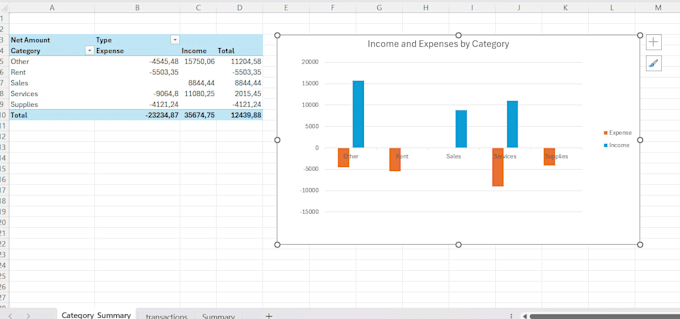
Este servicio proporciona archivos Excel limpios y bien organizados que transforman datos en bruto en insights claros. Incluye limpieza de datos, categorización de ingresos y gastos, resúmenes en tablas dinámicas e informes financieros diseñados para apoyar mejores decisiones empresariales.
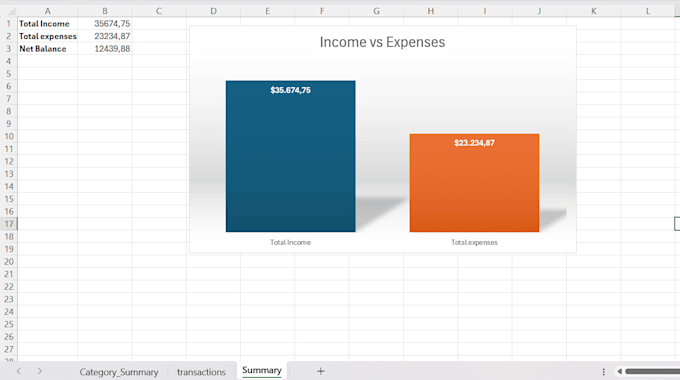
El análisis destaca métricas financieras clave como el ingreso total, los gastos totales y el saldo neto, ayudando a identificar los principales factores de coste y fuentes de ingresos. La estructura es reutilizable y adecuada para seguimiento mensual, informes y análisis continuos.
Este servicio es ideal para pequeñas empresas, autónomos y particulares que necesitan una visibilidad financiera clara sin sistemas complejos.
Por favor, contacte antes de hacer el pedido para confirmar el alcance del proyecto y el formato de los datos.
Traducción automática
What type of data is required to start the analysis?
Clean Excel files (.xlsx or .csv) are preferred, but raw data is also accepted. Data should include basic fields such as dates, amounts, and descriptions. Details can be confirmed before starting.
Is this service suitable for personal or business finances?
Yes. The analysis works for personal finance tracking, freelancers, and small businesses that need clear visibility of income, expenses, and financial summaries.
Does this service include charts or dashboards?
Basic visual summaries are included in the Standard package. Dashboard-style summaries are available in the Premium package.
Can the Excel file be reused for future months?
Yes. The delivered file is structured to be reusable, allowing new data to be added and automatically reflected in summaries and pivot tables.
Is this service automated with scripts or macros?
No macros or scripts are included by default. The analysis is built using standard Excel features such as formulas and pivot tables for compatibility and ease of use.