Explorar las categorías
Explora
Fiverr Pro
Español
$
USD
I will clean one CSV or XLSX file using rules we agree before work starts.
For $15, I will process one worksheet with up to 100 data rows (header excluded) and 15 columns:
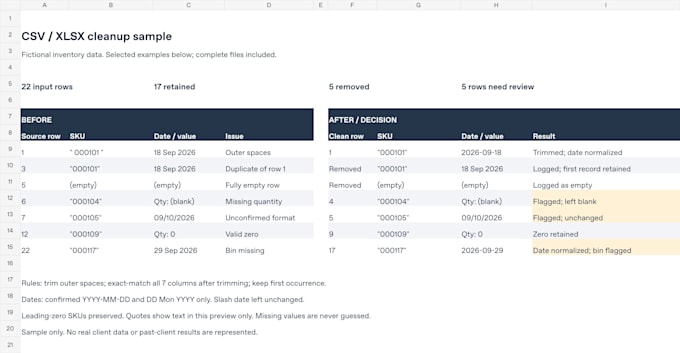
- Trim leading and trailing spaces
- Remove fully empty rows
- Remove exact duplicates using confirmed key columns and keep rules
- Standardize agreed number and date formats
- Flag missing or ambiguous values without guessing
- Preserve identifiers and leading zeros
Date conversion covers up to 2 columns after you confirm the source and target formats.
You receive a cleaned CSV or XLSX, a removed-record list, and a short QA report with row counts and review flags. Delivery: 2 days. Includes 1 revision within the original scope.
Excluded: fuzzy matching, manual enrichment, macros, complex formulas, charts, dashboards, PDFs, images, and store access.
Send only non-sensitive data you are authorized to share. Scripts and AI tools may support the work; disclose any processing restrictions before ordering so we can agree on permitted tools.
For larger files, message me first to agree scope and a Custom Offer before ordering.
What counts as a duplicate?
You confirm the exact-match key columns, whether to trim outer spaces first, and which occurrence to keep. Conflicting non-key values are flagged unless you approve a resolution rule. Similar spelling and fuzzy matching are excluded.
Will you fill in missing values?
Missing values are flagged and left blank. I do not invent product details, quantities, prices, or dates. Manual research and enrichment are outside this package.
Can you convert dates?
Yes, for up to 2 columns after you confirm source and target formats. Ambiguous dates such as 09/10/2026 stay unchanged and are flagged until their meaning is confirmed.
Can you keep leading zeros in SKUs?
Yes. Identifier columns are stored as text in XLSX. CSV retains the original characters, but spreadsheet apps may auto-convert them. Import identifier columns as Text, or choose XLSX for easier viewing.
Do you use scripts or AI?
Scripts may apply agreed transformations, and AI tools may help prepare or check the work. Tell me any AI or third-party processing restrictions before sharing a file. We must agree on permitted tools before work begins.
What should I avoid sending?
Do not send personal or confidential records, credentials, payment details, identity documents, health information, or data about children. Use a non-sensitive export or fictional sample. Share only data you own or have permission to share and process.
What does the QA report verify?
It checks agreed transformations, reconciles input, output and removal counts, and flags unresolved values. It does not certify the factual correctness of the source data. Review flagged records before using the cleaned file.
What files and tasks are excluded?
Basic covers 1 CSV/XLSX worksheet: up to 100 data rows (header excluded) x 15 columns. Larger files need a Custom Offer agreed before ordering. Excludes fuzzy matching, enrichment, macros, complex formulas, charts, dashboards, PDFs, images and account access.
