Explorar las categorías
Explora
Fiverr Pro
Español
$
USD

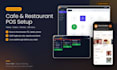
Run tables, orders, the kitchen and your menu from one simple system. I set up ready-to-use POS software for cafes, bistros and small restaurants, configure it for your venue and train your staff remotely.
What you get:
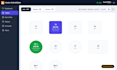
- Visual table plan with your areas (hall, garden, terrace)
- Order tickets with cash, card or on-account payments
- Kitchen and bar screen, plus help setting up your ticket printer
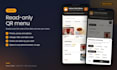
- Read-only QR menu with photos, allergens and table codes
- Staff logins by role: waiter, cashier, kitchen, manager
- Daily reports, end-of-day summary, stock tracking and low-stock alerts
- Manager PIN approval to delete, discount or comp items already sent to the kitchen, with an audit log
- Your menu entered for you (50 to 150 items by package)
It works in a web browser on a Windows PC, an Android tablet or a phone. No app store install needed.
Important: this system does not issue fiscal or tax receipts. If your country requires a certified cash register or fiscal device, you keep using it for official receipts.
Want to see it first? Message me and I'll walk you through a live demo.
Web Developer and Website Security
Idiomas
Does it print official fiscal or tax receipts?
No. It prints operational order and kitchen tickets and keeps your internal records. Official receipts must come from the certified cash register or fiscal device your country requires. Fiscal device and bank terminal integration are not part of this gig.
Which devices does it work on?
It runs in a modern web browser on a Windows cashier PC, an Android tablet or a phone. Staff can use several devices at the same time. No separate app store download is needed.
Can guests order from the QR menu?
No. The QR menu is read-only: guests see items, prices, photos and allergens, and your staff enter the order. This keeps billing and tickets under your staff's control.
Which languages and currencies does it support?
The interface is currently in Turkish. An English version can be added for your venue: message me before ordering so we can agree on the timeline and the currency you need.
What happens when the included period ends?
Cloud access pauses unless you renew. You can extend with the extra month option or a custom offer for a longer period. I remind you before the period ends.
What if our internet connection goes down?
The cloud setup needs internet, so an outage can interrupt it until the connection is back. If your connection is unreliable, message me before ordering and we can discuss a local install on your cashier PC.
Is the setup done on site?
Setup and training are remote, by screen sharing through Fiverr. You only need the devices you will use and an internet connection.


