Explorar las categorías
Explora
Fiverr Pro
Español
$
USD
Tu visión, nuestro código
Transformaré tu sitio web en una app de Android de alto rendimiento y sensación nativa usando tecnología WebView avanzada, mucho más allá de los cargadores básicos que ofrecen la mayoría de los gigs.
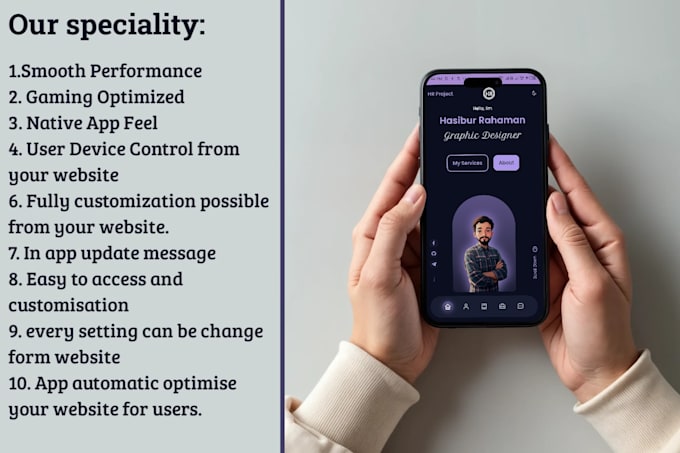
¿Qué hace que mis apps sean especiales? A diferencia de las conversiones estándar de WebView, las mías están optimizadas para velocidad, juegos e integración con dispositivos reales:
Rendimiento ultra suave: Aceleración por hardware, carga rápida, transiciones fluidas
Optimizado para juegos: Forzar 60/120fps mediante API JS personalizada, múltiples pestañas (a demanda), perfecto para juegos web en 3D y de alto nivel.
Experiencia nativa: Potentes APIs JS 84+ (poco comunes): Obtener info del dispositivo (RAM, CPU, señal, almacenamiento, conexión), controlar orientación/brillo/linterna, gestionar archivos/carpetas locales, preferencias compartidas, sobreescrituras de viewport y más.
Cacheo offline, barra de progreso, enlaces profundos/dinámicos, esquema personalizado y otros
Paquetes:
Básico :
Pro :
MAX :
[Importante: Antes de realizar cualquier pedido, por favor contáctame primero]



Traducción automática
¿Qué debo proporcionar para comenzar?
Solo necesitas la URL de tu sitio web (si está en línea) o los archivos del sitio (si está offline). Para la mejor app, también proporciona: * Icono de la app (PNG, 720x720 píxeles) * Nombre de la app (por ejemplo, "Mi App") * Nombre del paquete – Puedo sugerir uno si es necesario ¡El enlace o los archivos del sitio son lo más importante!
¿Puedo usar cualquier sitio web para la conversión?
¡Sí! Funciona con cualquier sitio web responsive. Si tu sitio no está optimizado para móvil, incluyo Adaptación Automática de Pantalla para que luzca perfecto en teléfonos y tablets.
¿Qué pasa si mi sitio web está offline o es estático?
¡No hay problema! Envíame los archivos HTML, CSS y JavaScript en un ZIP. La app también funcionará offline con Detección de Sitio Online/Offline, permitiendo a los usuarios ver contenido sin internet y sincronizar automáticamente cuando estén en línea.
¿Qué pasa si el usuario abre la app offline?
La primera vez necesita internet — carga y cachea el sitio. ¿Offline después? Muestra la versión cacheada. ¿No hay cache? Pantalla de error bonita con animación y opción de refrescar. ¿Internet vuelve? Sincroniza automáticamente el contenido actualizado. ¡Experiencia fluida online/offline!
¿Cuál es la diferencia entre los paquetes Basic, Pro y Max?
Basic: Funciones esenciales como temas, soporte offline, cámara, subir/bajar archivos. Pro: Añade APIs (barra de progreso, ubicación, notificaciones push, info del dispositivo). Max: Todo + más APIs y control avanzado + funciones adicionales (renderizado GPU, control de linterna, múltiples pestañas como Chrome).
¿Soporta subir archivos, cámara o ubicación?
¡Sí, en todos los paquetes! Cámara/audio para grabar Subir/bajar archivos Ubicación/GPS (Pro/Max) Capacidad de leer/escribir datos locales sin permiso del usuario (Max) Perfecto para apps que necesitan medios o datos del usuario.
¿Qué hay de soporte offline y velocidad de carga?
Modo offline: Funciona sin internet, cachea contenido. Preloader ultra rápido (Pro/Max): Pre-carga páginas en segundo plano para navegación instantánea. Animaciones de carga personalizadas y pull-to-refresh. Barra de progreso Material con control de visibilidad (Pro/Max).
¿Cuándo debería escoger el paquete Basic?
Basic es perfecto para sitios simples como tiendas, portafolios, blogs. Incluye todo lo esencial (temas, offline, cámara, subir archivos) con rendimiento fluido. ¡Ideal para sitios web estándar!
¿Cuándo elegir el paquete Pro?
Elige Pro para sitios de juegos, JS pesado, diseños complejos. Añade más de 20 APIs (barra de progreso, ubicación, notificaciones push, info del dispositivo) para mejor velocidad y control respecto a Basic.
¿Quién necesita el paquete Max?
Max es para apps administrativas o control total (84+ APIs). Acceso completo a hardware: linterna, brillo de pantalla, salud de batería, info de RAM/CPU, gestión de archivos, múltiples pestañas como Chrome, comprobación de velocidad de conexión, alta tasa de refresco, almacenamiento local y funciones nativas. Perfecto para apps complejas que requieren control completo.